
AI Bot Management Hub for Building and Deploying Assistants
BotForge is a platform for creating, customising and deploying AI assistants in a few clicks. Teams run several specialised bots in one place, from customer support to code review, train each one on their own documents and plug them into their workflows.
The Operational Problem & Bottlenecks
The client wanted AI assistants for different jobs, such as answering customer questions and reviewing code, but every new bot meant a separate setup, separate knowledge and no central place to manage them. They needed one hub where non-specialists could create a bot, give it the right knowledge and put it to work.
Functional & Non-Functional Specifications
Engineering Strategy & System Conception
A simple management hub with two areas, Bots and Documents, so creating an assistant and giving it knowledge takes minutes rather than an engineering project.
System Topography & Data Flow Design
A React.js and TypeScript front end with a Python FastAPI backend. Uploaded documents are split into chunks, turned into OpenAI embeddings and stored in PostgreSQL with pgvector. When a user asks a bot something, the most relevant chunks for that bot are retrieved and passed to GPT-4o through LangChain (retrieval-augmented generation), so answers stay grounded in that bot's own documents. Each bot keeps its own instructions, knowledge and history.
Operations Control
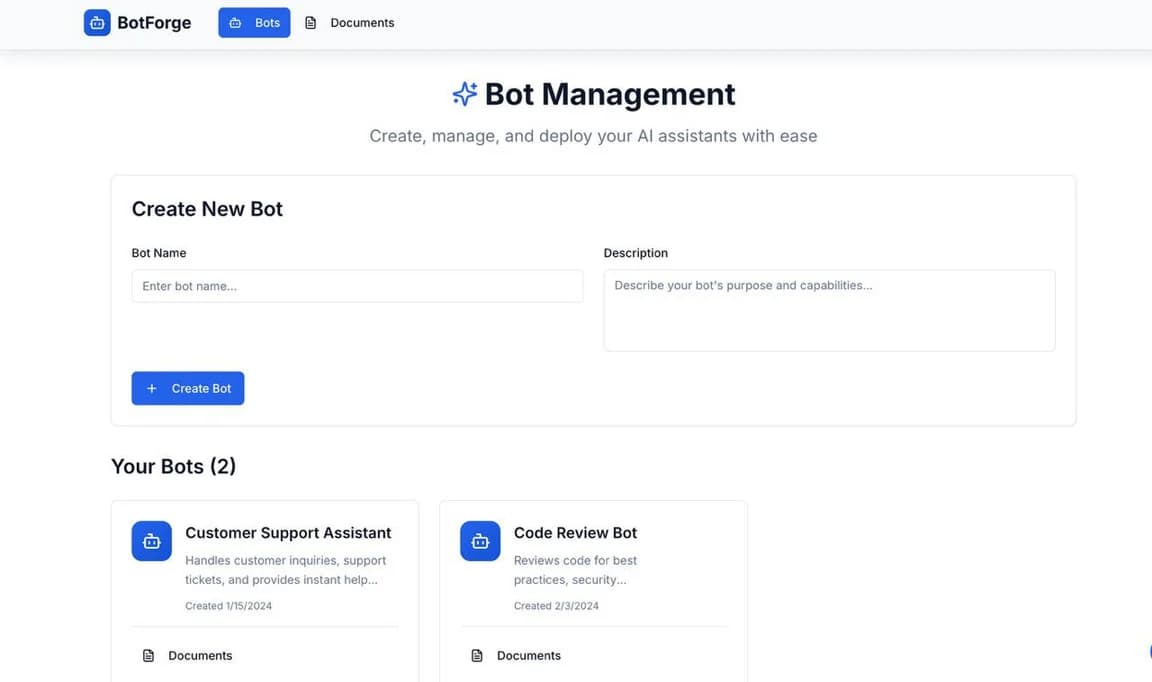
The Bot Management screen lets teams create a bot with a name and description, see all their bots with what each one does and when it was created, and open each bot's documents. A separate Documents area manages the knowledge each assistant uses.
Third-Party Services & Hardware Protocols
Delivered Business Results
100% Intellectual Property Transfer & Continuity
Appfeeders delivered 100% IP ownership, transparent CI/CD pipeline access, and daily timezone synchronization with the client's product leads. The engagement continues with ongoing pod maintenance and iterative feature sprints.
Facing Similar Technical or Scalability Hurdles?
Schedule a free 30-minute technical consultation with an Appfeeders Principal Solutions Architect to review your architecture roadmap under mutual NDA.
Discuss Your Architecture